Overview
General overview
UviSpace Main Controller is part of the UviSpace project, whose aim is to control an indoor intelligent space where several unmanned vehicles are simultaneously observed and controlled through a distributed vision system.
The Main Controller should be executed in a PC or embedded SoC (for example, ZedBoard) that has visibility of the whole system, so it can control the different parts.
The purpose of Main Controller is to decide the actions vehicles have to take in order to achieve their goals, based on the data obtained through the vision system. To accomplish this, the main tasks are:
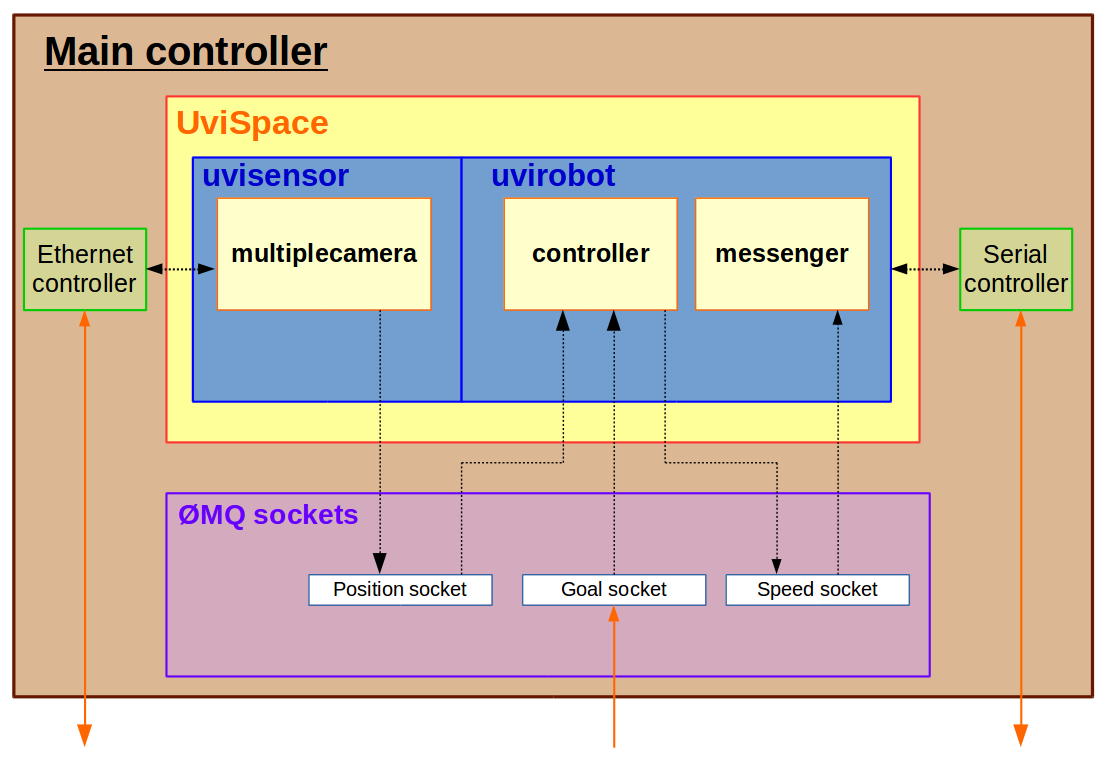
- Communicate with the FPGA-based localization nodes, using the Ethernet LAN network.
- Merge the data obtained from the localization nodes.
- Get the global coordinates of the UGVs.
- Given the destination of the UGVs, calculate the optimal paths.
- Calculate the UGVs speed, using a navigation model.
- Communicate with the vehicles boards, using the XBee protocol, and send them the speed set points.
Software project
UviSpace Main Controller is written in Python2, and it is structured into 2 main packages, uvirobot and uvisensor.
The uvirobot package deals with the classes and functions needed to implement the algorithms for moving an UGV and communicating with it, while the uvisensor package is used to communicate with FPGA devices using a TCP/IP connection and receive scene information captured through camera peripherals.
uvirobot
The uvirobot package consist in 2 callable scripts:
- messenger.py establishes the communication to the specified UGV, using the XBee protocol. Thus, prior running it an XBee module has to be connected to the PC, and another one to the Arduino board serial port, and both configured accordingly. Once the communication is established, the module listens for speed set points and send them to the UGV. When the execution is canceled, a plot with the delay times is obtained and then the program ends.
- navigator.py listens for input UGV position values and destination coordinates, calculates the UGV optimal path, and finally outputs the speed set points needed to achieve the planned path.
Moreover, there are 5 importable libraries inside the uvirobot package:
- path_tracker.py contains a class whose methods calculate an UGV’s path points, once given a position and destination, and then stores them in an attribute.
- plotter.py contains functions used to construct a graph with a predefined format. It is designed to map the calculated vs. real path of a UGV, and the delay times.
- robot.py contains the RobotController() class, where each instantiated object represents a UGV, and establishes the upper interface for working with its speed values.
- serialcomm.py contains the SerMesProtocol() class, which is a child of the built-in python pyserial class. It defines a serial protocol, which will be used by the XBee modules for communicating the CPU with a UGV.
- speedtransform.py contains the Speed() class, for dealing with operations related to the speed values, such as transform between different scales or ensuring that the values are between valid boundaries.
Finally, the package contains a couple of auxiliary modules into the resources folder:
- teleoperation.py is a callable module that allows to control the UGV with the keyboard, which is specially useful when the uvispace package has to be tested.
- set_goal.py is a callable module that allows setting new goal points when the system is running.
uvisensor
The uvisensor contains 1 callable module, multiplecamera.py. It is based on multithreading. The purpose of this module is to manage the information of N cameras, merge the vertices of every tracker and obtain the final number of UGVs(triangles) with their pose. There is a shared variable with all the vertices obtained from each camera.
The connection via TCP/IP to the cameras, as well as the processing of the images from each camera, is achieved in parallel.
Finally, another thread communicates with the user in order to get commands. At the moment, the only command is ‘Quit Program’ (‘Q’), but this functionality can be easily increased in the future.
Summing up, the list of threads is:
- 1 main thread that will merge the information from every camera (VideoSensor).
- N threads for getting data from the N cameras connected to the system.
- 1 user oriented thread for getting commands from the user.
The package has, as well, 4 importable modules:
- client.py contains the Client() class, which is a child of the Socket class from the socket.socket built-in Python module. This class contains methods for communicating specifically with the design FPGA hardware. Its methods allow to open and close the connection correctly, and to write and read from valid registers with the right format.
- geometry.py contains 2 classes. The Triangle() class is used for performing geometrical operations inherent to isosceles triangles, in order to get its base length, barycentre, position, angle... The Segment() class is used to determine a segment from its 2 points, and calculate afterwards the distance to another point.
- imgprocessing.py contains the Image() class, which has image-oriented methods, based on matrix operations, for getting useful information from image data.
- videosensor.py has the VideoSensor() class and several functions related to it. Each instantiated object represent an external FPGA device. Thus, this class has methods for setting up the TCP/IP connection, configuring the FPGA registers, and interact with it.